
Get every document in,however it arrives
Upload a file, email it to your business’s own address, or snap it on your phone. Doctraction reads bills, sales invoices and bank statements and gets them ready to review.
Three ways in. One inbox.
However a document arrives, it lands in the same place and follows the same checks.
- Drag and drop PDFs, photos and CSV statements, several at a time (up to 20 MB each)
- Email documents to your business’s private inbox address
- Capture with your phone camera, photo library or a PDF in the mobile app
- Every file keeps its original, attached to the record
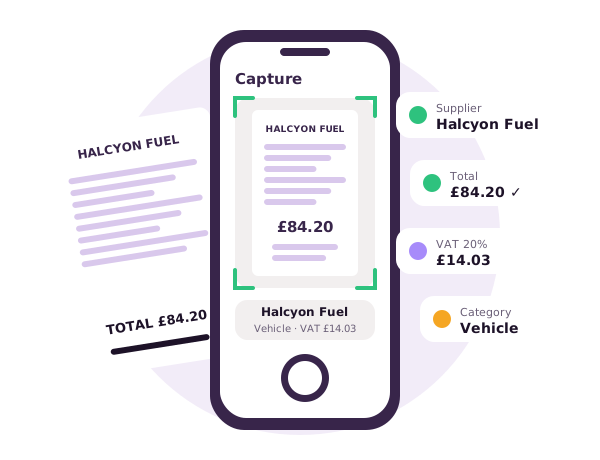
How documents get in
Upload
Add files from your computer. PDFs, JPG and PNG photos, and CSV bank statements are all accepted, with live progress as they upload.
Email-in
Every business has its own inbox address. Email a bill from anywhere and it is uploaded for that business. Only your team and approved senders are accepted, and you get a short reply to confirm.
Mobile app
Photograph a receipt, pick one from your photo library or choose a PDF. It is sent straight to your inbox for review.
Three document types, read properly
Bills
Supplier, invoice number, dates, currency, totals, tax and every line item.
Sales invoices
Customer, reference, dates, totals and tax, ready to publish with the original attached.
Bank statements
Account, period, opening and closing balances, and each transaction with money in, money out and running balance. Excel and CSV import are supported too.
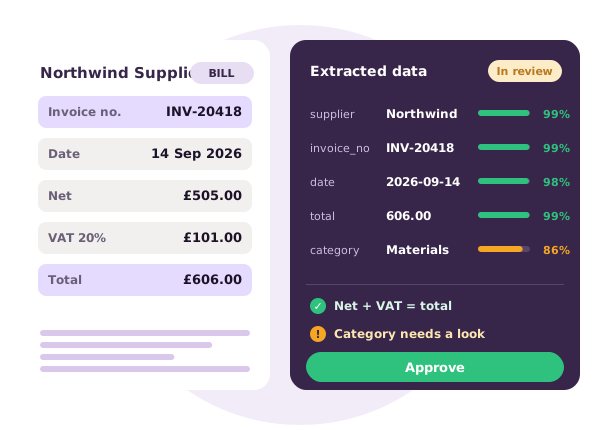
Accurate where it counts
- Digital PDFs are read directly from their text layer, so the numbers are exact
- Scans and photos are read with OCR that runs on our own servers
- Totals, tax and line items are cross-checked with arithmetic
- Every field has a confidence score so you know what to look at
- Multi-currency documents are converted with the exchange rate for the document’s date
Typing it in vs checking it once
| Doing it by hand | With Doctraction | |
|---|---|---|
| Entering a bill | Re-key supplier, dates, tax and every line | Review a form that is already filled in |
| Mistakes | Typos, wrong tax rate, the same bill twice | Totals cross-checked; possible duplicates flagged |
| Coding | Pick an account for every line, every time | Pre-filled from what you chose last time |
| Paper trail | Files scattered across inboxes and folders | Original attached to the record in your ledger |
| Cost | Your time, every month | 1 credit per bill or invoice, only once approved |
Questions
Which file types can I send?
PDF and image files (such as JPG and PNG) for bills, invoices and statements, plus CSV and Excel for bank statements. Each file can be up to 20 MB.
What happens if a document can’t be read?
It is flagged rather than silently dropped, so you can upload a clearer copy or contact us.
Who can email documents in?
Members of your team and any extra senders you allow. Automatic replies and bounces are ignored, and each email is only processed once.
Is my document sent to an AI service?
No. Reading happens on Doctraction’s own servers. Documents are not sent to third-party AI model services.
Does capturing a document cost credits?
No. A credit is used only when a document is approved, never for uploading or for rejected documents.
Keep exploring
Stop typing. Start growing.
Try Doctraction free for 14 days with 50 credits, or see it live in a 20-minute demo.
Start free trial Book a demo