
Check it once.Publish it with confidence.
Every document is read, cross-checked and pre-coded. High-confidence bills reach you as drafts, everything else is checked by our team first. You approve, and only then is a credit used.
From upload to ledger in five steps
Read
The document is read and its fields, lines and totals are extracted.
Check
Arithmetic checks run, and possible duplicates and gaps are flagged.
Review
Our team checks it, or you do when it arrives as a high-confidence draft.
Approve
You approve it. This is the moment a credit is used.
Publish
It is sent to your accounting software with the original attached.
The document on one side. The data on the other.
Open any record to see the original next to the extracted data. Edit anything: header fields, line items or statement transactions.
- A confidence score on every field, with low-confidence fields highlighted
- Edit fields and lines, and change accounts and tax rates from your own lists
- Reject a document with a reason, and you are not charged for it
- Everything you change is recorded in the document’s history
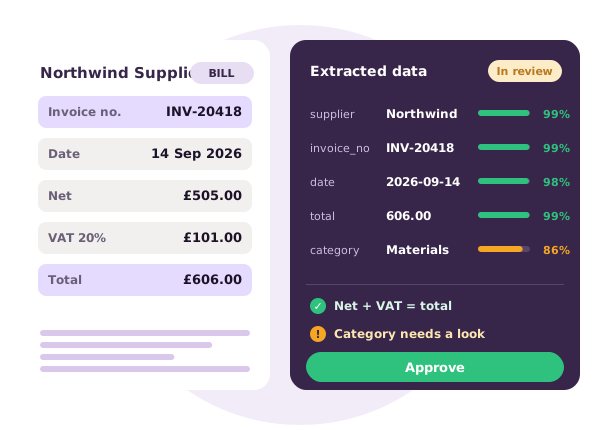
Mistakes get caught before they reach your books
Maths that adds up
Line items against subtotal, subtotal plus tax against total, and for statements opening balance plus money in minus money out against the closing balance.
Possible duplicates
If the same supplier and reference has already been uploaded, you see a warning before you approve it.
Coded from your history
Lines are pre-coded with the account and tax rate you chose last time for that supplier, so repeat bills are quick to confirm.
Your own master data
Accounts, tax rates and contacts come from your connected accounting software, so what you pick always exists in your ledger.
A history of everything
Uploaded, reviewed, edited, approved, exported: each step is logged with who did it and when.
Exports that don’t get lost
Publishing runs in a queue with automatic retries for temporary problems. If it fails, the reason stays on the document until you fix it and publish again.
Always know where a document is
Being read and checked.
Reviewed and waiting for you to open, check and publish.
Something needs fixing before it can be published.
Published to your accounting software with the original attached.
Not usable, with the reason shown. No credit is used.
Edited since publishing. Re-export to update the existing record.
Questions
Who reviews my documents?
Doctraction’s review team checks extracted data before it appears in your list. Bills and sales invoices that are read with high confidence arrive as drafts that you check and approve yourself.
When is a credit used?
When a document is approved. One credit for a bill or sales invoice, two credits for each page of a bank statement. Rejected documents are never charged.
Can I change something after it has been published?
Yes. Edit it and it is flagged as changed. Re-export to update the same record in your accounting software.
What if publishing fails?
Temporary problems are retried automatically. Problems you can fix, such as a missing account or tax code, are shown on the document so you can correct them and publish again.
Keep exploring
Stop typing. Start growing.
Try Doctraction free for 14 days with 50 credits, or see it live in a 20-minute demo.
Start free trial Book a demo